Contents
Listing one item on eBay isn't usually the problem.
Listing 50 is.
Take the photos. Keep track of which photos belong to which product. Write the titles. Fill in Item Specifics. Choose categories. Write descriptions. Check everything. Publish. Then do it again.
And again.
The biggest improvement doesn't come from learning to type faster. It comes from separating the work that actually needs you from the repetitive work that doesn't.
Start by Organizing the Products, Not the Listings
If you have 50 items to list, don't begin by opening 50 eBay listing forms.
Prepare the products first.
Group similar items when that makes sense. Have everything ready to photograph. If an item has a defect, label, model number, size tag, or another detail a buyer needs to see, make sure you photograph it.
The goal is simple: finish one type of work before moving to the next.
Photographing a few products, stopping to write a listing, going back to photography, and then researching another product creates unnecessary switching between tasks.
Batch the physical work first.
Have 50 products waiting to be listed? Zetlis can turn a batch of up to 50 products into complete eBay listings in one bulk workflow. Review each listing, publish directly to your connected eBay account, or leave it saved in History and come back later. Try Zetlis free →
Take the Photos in Batches
You don't need professional equipment.
A modern smartphone is enough.
Set up one place with good lighting and a clean background and work through your products.
For each item, take enough photos to show:
- the complete product
- important angles
- labels or model information
- size information when relevant
- included accessories
- wear, damage, or defects
The purpose isn't to take a fixed number of photos. It's to give the buyer — and the listing process — enough information to understand the product.
Create the Listings in Bulk
This is where the biggest time savings can happen.
Traditionally, sellers may prepare spreadsheets, copy product information, create templates, and move that information into individual listings.
Those tools can still be useful for certain businesses.
But you don't necessarily need to write 50 listings manually just because you have 50 products.
With Zetlis, you can submit a batch of up to 50 different products through the bulk workflow.
Each product is analyzed separately and Zetlis creates the listing information for it, including:
- three complete, ready-to-use eBay title options
- suggested keywords
- description
- Item Specifics
- category information
- other listing details
Instead of starting with 50 blank listing forms, you start with listings ready for your review.
Watch how bulk listing works: upload a batch, choose which products to analyze, and review each listing as it's ready.

The dedicated Zetlis bulk listing page walks through the mechanics step by step.
Review the Listings — You Don't Have to Finish All 50 at Once
Bulk doesn't mean blindly publishing everything.
Review each listing before it goes live.
You may know something the photos can't show: how the product was used, whether it was tested, whether an accessory is missing, or whether a defect needs more explanation.
Check the title, condition, Item Specifics, price, shipping information, weight, package details, and anything else relevant to that product.
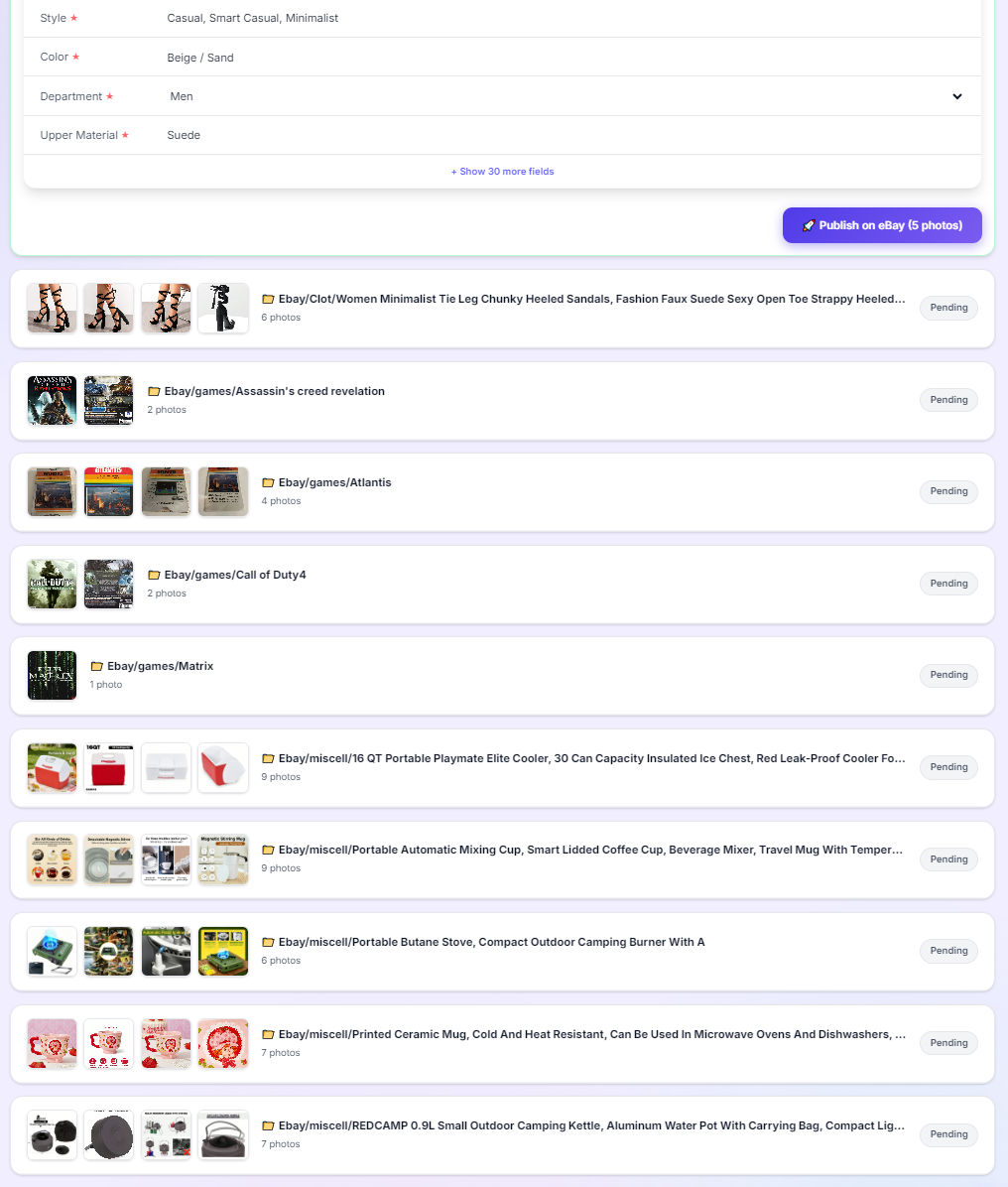
But there's no requirement to sit down and finish all 50 listings at once.
Your listings remain available in Zetlis History.
You can review and publish part of the batch today and come back to the rest later without starting the analysis from scratch.
Your Work Doesn't Disappear After Publishing
Creating the listing isn't useful only once.
Listings you've already created remain in your Zetlis History.
You can return to an existing listing, edit it, change information, and publish it again without using another analysis credit for that same existing listing.
That can be especially useful when you're managing larger batches of inventory and don't want to rebuild work you've already done.
Use Seller Profiles for Information and Preferences That Repeat
Not everything changes from product to product.
Your selling preferences, shipping origin, package defaults, writing style, and other seller information may repeat across many listings.
Zetlis Seller Profiles let you save reusable information and preferences that can be applied during listing creation.
You can also create different Seller Profiles for different types of products or selling styles.
That becomes increasingly useful when you're working through larger batches.
Publish Directly to eBay
Once a listing is reviewed, you don't need another manual workflow just to move it into eBay.
Zetlis connects directly to your eBay account.
You can publish the reviewed listing directly to your connected eBay account without copying titles, descriptions, Item Specifics, and other information from one platform to another.
And because each listing remains in History, you can decide when to review and publish each item rather than treating the entire batch as one all-or-nothing job.
What About eBay's Own Bulk Tools?
eBay also provides tools for sellers managing multiple listings, and those tools can be useful — especially when working with listings that already exist.
The difference is where the bottleneck occurs.
Bulk editing helps manage listings at scale.
When you're starting with 50 physical products that still need listings, the bigger opportunity is reducing the repetitive work required to create those listings in the first place.
That's the part of the workflow Zetlis is designed to simplify.
A Better 50-Item Workflow
Instead of:
product → photos → write listing → publish → next product
think:
prepare the products → photograph the batch → create listings in bulk → review → publish when you're ready
You still make the decisions that require your knowledge.
You just don't have to rebuild the same listing workflow 50 times.
If 50 products are waiting to be listed, turn them into a batch instead of 50 separate projects.
Write perfect eBay titles in seconds
Upload a photo of any product and Zetlis's AI generates an optimized title, description, keywords, and category — ready to publish to eBay instantly.
Try Zetlis free →No credit card required · Start with 10 free listings